

AI agents
How agents discover Spec0 capabilities, react to exit codes, and use the Spec0 MCP server — public docs tools plus authenticated, org-scoped API tools.
Spec0 is built for AI-driven engineering workflows. Three integration points an agent uses today:
1. Self-describing CLI
Every command emits machine-readable output. The full surface is exposed as a manifest:
spec0 commands --output=json | jq '.commands[].name'The manifest includes flags, arguments, and exit codes for every command. An agent can compose operations without hardcoding CLI knowledge.
2. Stable exit codes
Codes are part of the contract — never repurposed:
| Code | Meaning |
|---|---|
| 0 | success |
| 2 | usage error |
| 3 | not authenticated |
| 4 | permission denied |
| 5 | not found |
| 6 | conflict |
| 7 | validation failed |
| 8 | rate limited |
| 9 | upstream server error |
| 10 | network error |
Every command's exit codes are documented in its manifest entry; agents should branch on these rather than parse stderr.
3. Agent mode
Set SPEC0_MODE=agent to flip every default for machine callers: JSON output, no colour, no spinners, no update banner.
export SPEC0_MODE=agent
spec0 api list   # JSON, no ANSI, no progress
Spec0 MCP server
One Model Context Protocol server, one endpoint, two tiers of tools. The transport is Streamable HTTP — a single endpoint you POST to, the same whether or not you authenticate:
https://api.spec0.io/mcp # Streamable HTTP (single endpoint, HTTP POST)Anonymous callers get the documentation tools — your agent searches and retrieves Spec0 docs while it codes against Spec0, with citation URLs back to this site. Same idea as Context7, but for our platform.
Authenticated callers (a Spec0 token in an Authorization: Bearer header) get those plus org-scoped tools over their own indexed OpenAPI specs — semantic search across the org's registry, full spec retrieval, and an API index, all token-scoped to the caller's org.
Retrieval for every Spec0 MCP tool — docs and org-scoped alike — runs on Spec0's infrastructure. Neither tier uses your own LLM provider key; the agent is the LLM. The BYO provider key is for a different surface (Ask Spec0 chat inside the dashboard, the spec critic, the changelog generator). See AI provider.
Anonymous vs authenticated
| Anonymous | Authenticated (Bearer token) | |
|---|---|---|
| Tools | search_docs, get_page, list_sections | the docs trio + search_apis, get_api_spec, list_apis |
| Scope | the public docs corpus | your org's indexed APIs only |
| Auth header | none | Authorization: Bearer <token> |
| Citations | https://docs.spec0.io/... | https://app.spec0.io/apis/<apiId> |
Calling an org-scoped tool without a valid token doesn't error the transport — it returns a structured "authentication required" message so the agent can prompt you to wire up a token and retry.
Documentation tools (anonymous)
| Tool | What it does | Inputs |
|---|---|---|
get_page | Fetch the full markdown content of a single Spec0 docs page by its path (e.g. 'cli/commands/publish', 'concepts'). Use after `search_docs` when a chunk excerpt isn't enough context. Returns the page title, absolute URL, and the full reassembled content. | path |
how_to_integrate_spec0 | Get the exact, copy-pasteable steps to integrate Spec0 from scratch — install the CLI, authenticate, publish an OpenAPI spec, and wire the Spec0 MCP server into your editor/agent and CI. Free and anonymous: no token required to call this. Use it as the FIRST step when a user asks 'how do I get started with Spec0', 'how do I connect Spec0 to Cursor/Claude', 'how do I publish my API to Spec0', or 'how do I authenticate'. Pass `goal` to focus the answer: 'overview' (the full happy path, default), 'authenticate' (sign in via the browser OAuth flow), 'push-spec' (publish a spec), 'connect-agent' (wire the header-less MCP config — signing in via OAuth unlocks the org-scoped API tools), or 'ci' (generate a CI workflow). Returns ordered steps and, for the auth/connect goals, the MCP client config to paste. Follow the steps in order and run the commands as shown. | goal? |
list_sections | Returns the top-level sections of the Spec0 docs (e.g. 'cli', 'mock-server', 'platform') with a one-line description of each. Use this to scope a `search_docs` call to a specific section, or to give the user an overview of what's available. | — |
search_docs | Semantic search across the public Spec0 documentation (platform, CLI, mock-server). Returns up to top-k chunks with page title, absolute URL, an excerpt, and a similarity score. Use this when answering questions about Spec0 itself: how to publish a spec, what a CLI command does, how mock-server variants work, etc. Synthesise your answer from the returned chunks and cite the URLs verbatim. | query, section?, topK? |
To wire up the anonymous tools, point your client at the endpoint with no headers:
{
  "mcpServers": {
    "spec0": {
      "url": "https://api.spec0.io/mcp"
    }
  }
}
claude mcp add --transport http spec0 https://api.spec0.io/mcp{
"servers": {
"spec0": {
"type": "http",
"url": "https://api.spec0.io/mcp"
}
}
}Restart the client and the three docs tools appear in its tool palette. (Claude Desktop uses the same mcpServers shape as Cursor.)
You can also get the URL from the CLI:
spec0 mcp url
# Spec0 MCP server:
#   https://api.spec0.io/mcp
Org-scoped API tools (authenticated)
Add a Spec0 token to the config and the org-scoped toolset appears — these run against your own org's indexed specs, never anyone else's.
| Tool | What it does | Inputs |
|---|---|---|
describe_team | Describe one of your organisation's teams as a graph neighbourhood, by team id (UUID): the APIs it OWNS, the APIs it CONSUMES (holds grants on) with each grant's status, and its members (display names + count). Use this to answer 'what does the Payments team produce and depend on, and who's on it?'. Requires authentication. Scoped to your org: a team in another organisation reports 'not found'. Names only — never emails. | teamId |
get_api_changelog | Read the changelog and breaking-change history for ONE of your organisation's APIs, by API id (UUID). Requires authentication. Three modes by argument: (1) no version args → the latest published version's changelog prose, its breaking-change summary, when it was published, the source (MANUAL vs AUTO_LLM), plus a short list of recent versions; (2) toVersion only → that version's stored changelog + breaking-change summary; (3) fromVersion AND toVersion → a LIVE diff computed across those two (possibly non-adjacent) versions, answering "what breaks if I upgrade from X to Y?" with a digest of breaking changes. Versions are matched by their tag (e.g. "1.2.0"). Unknown tags return a clean error. A version with no authored changelog still returns its breaking-change summary. Cite the returned url verbatim. | apiId, fromVersion?, toVersion?, apiRef? |
get_api_consumers | List who CONSUMES one of your organisation's APIs — its consumers — by API id (UUID). This is the blast-radius / impact answer: 'if I make a breaking change to this API, which teams and services are affected, and who do I notify?'. Returns the API's owning team, the total and approved grant counts, and each consumer's name, kind (team or service), managing team, and grant status (APPROVED / PENDING / REJECTED). Requires authentication. Scoped to your org: an API belonging to another organisation reports 'not found'. Names only — never emails. | apiId |
get_api_health | Report the quality/health of ONE of your organisation's APIs from its latest Spectral lint run, by API id (UUID). Requires authentication: sign in via your MCP client's OAuth browser flow (no token header). Returns an overall score (0–100, higher is better), the count of error/warning/info/hint findings, when it was last linted, the ruleset used, and a short digest of the top issues (severity-ordered) with rule code, message, and JSON path. Use this to answer "is this API healthy / spec-clean?", to decide whether a spec is ready to publish, or to surface the worst lint problems. If the API has never been linted you get an actionable state (run `spec0 lint <spec>`), not an error. Cite the returned url verbatim. | apiId |
get_api_owner | Find who owns ONE of your organisation's APIs, by API id (UUID). The OWNER is the team: the returned team id and name are the authoritative answer to "who owns this API?" or "who do I talk to about this endpoint?". Also returns the team's member count and the members' display names where available (names only — never email addresses; members with no display name set are omitted from the name list but still counted, so prefer the team name over individual names). Requires authentication. Scoped to your org: an API that belongs to another organisation reports "not found". | apiId |
get_api_spec | Fetch a HIGH-LEVEL overview/index of ONE of your organisation's indexed APIs by its id (UUID). Requires authentication. Returns the API name, version, a citation URL, and — for small specs — the raw OpenAPI document. For large specs the raw body is omitted and a structured overview (title, version, server URLs, operation/schema counts, and the list of operations as method+path+operationId+summary) is returned instead, to keep the response bounded. Use this only to orient yourself or to count or list operations — NEVER to read full endpoint content. For the detail of a specific endpoint use search_operations then get_operation; for a schema/model use search_components. Optionally pass an environment name to get the spec that is current in that environment (e.g. 'staging' vs 'production'); omit it to get the API's latest spec. | apiId?, environment?, apiRef? |
get_operation | Fetch the structured detail of ONE exact operation — a single HTTP method + path — from one of your organisation's indexed APIs. Requires authentication. Use after search_operations (or get_api_spec's overview) once you know the method and path: returns the operationId, summary, description, a compact list of parameters (name/in/required/type), a compact request-body view (media types + top-level field types), and the response codes with their descriptions — bounded to that one operation, never the whole spec. method is the HTTP verb (GET, POST, …); path is the exact template (e.g. /v1/refunds/{id}). | apiId, method |
get_org_graph_summary | A bounded overview of your organisation's API graph: total teams, APIs, and services, and per team how many APIs it owns, how many it consumes, and its member count. Use this to get the shape of the org before drilling in with get_api_owner, get_api_consumers, or describe_team. Requires authentication. Names and counts only — never emails. Takes no arguments; scoped to your org. | — |
get_schema | Fetch ONE data shape (component schema) of one of your organisation's APIs by API id and schema name, from that API's latest published version. Requires authentication. PREFER THIS over get_api_spec for any "what fields does X have" question: it returns the schema's description and its fields (name, type, required flag, description) plus the facts a spec cannot give you — which operations carry the shape, which sibling schemas reference it, and which OTHER APIs contain the identical shape (structural twins). Costs a fraction of the tokens a full spec does. Resolve apiId with search_apis or list_apis, and the schema name with list_schemas, if you only have names. | apiId, name, apiRef? |
get_schema_impact | Answer "who breaks if I change this data shape?" for ONE schema of one of your organisation's APIs. Requires authentication. Combines facts no spec contains: the operations that carry the schema, the CONSUMERS of its API (teams and services holding grants, with grant status) who would be affected by a breaking change, the sibling schemas that reference it, and the identical shapes in other APIs (structural twins) that likely need the same change — each with its own consumer count. Use this before proposing a change to a shared shape, and to decide who to notify. Names only — never emails. Note: grants are held at API granularity, so consumers listed are the API's consumers, not per-operation. | apiId, name |
list_apis | List the OpenAPI specs YOUR organisation has indexed in Spec0, each with its id, name, version, and a one-line summary. Requires authentication. Use this to discover which APIs exist before calling search_apis or get_api_spec. The result names the organisation it covers (`orgName`) — you cannot choose the organisation, it comes from your token. State that name when reporting results, and if an API the user expects is absent, call whoami to check whether they belong to other organisations before telling them it does not exist. | scope? |
list_my_teams | List the teams in YOUR organisation, each with its id, name, and member count. Requires authentication. Scoped to your org — only your organisation's teams are returned, never another org's. Use this to discover team ids before calling get_api_owner or search_apis_by_owner, or to answer "what teams exist here?". Names and counts only — no member emails. | — |
list_schemas | Index of the data shapes (component schemas) across your organisation's APIs, from each API's LATEST published version. Requires authentication. PREFER THIS over get_api_spec when you need to FIND a shape or a field: the optional `search` matches BOTH schema names AND property names, so "which of our APIs carry a tax_id field" is one call instead of downloading every spec. Returns one compact row per schema (API, schema name, version, field count, how many operations carry it, and how many places the identical shape exists). Pass `apiId` to scope to one API, or `tag` to scope to a domain label (e.g. "payments"). Follow up with get_schema for the resolved shape, or get_schema_impact for the consumer blast radius. | search?, apiId?, domain?, limit?, apiRef? |
search_apis | Semantic search across YOUR organisation's indexed OpenAPI specs (operations, schemas, descriptions). Requires authentication: sign in via your MCP client's OAuth browser flow (no token header). Returns up to top-k chunks with the API title, a citation URL into the Spec0 app, an excerpt, and a similarity score. Use this to answer questions about the caller's own APIs — what an endpoint does, which API owns an operation, etc. Optionally narrow to a single API with apiId. Cite the URLs verbatim. | query, apiId?, topK? |
search_apis_by_owner | List the APIs owned by ONE of your organisation's teams, by team id (UUID). Requires authentication. Returns the team name and each owned API's id, name, and version. Use after list_my_teams to answer "what does team X own?". Scoped to your org: a team that belongs to another organisation reports "not found" and never leaks its APIs. | teamId |
search_components | Semantic search across the COMPONENTS (schemas/models — request and response data shapes) of ONE of your organisation's indexed APIs. Requires authentication. Use this for FUZZY discovery of a data model when you only have a vague description ("the thing that holds billing details") — never fetch a whole spec for a shape question. Returns the matching component chunks with a namespaced {api}/{Schema} identifier, the component name, and the full grounded text. When you know (or have found) the name, PREFER get_schema for the exact resolved fields, the operations that carry it and its identical twins, or list_schemas to search by field name across APIs. apiId is required; resolve it first with search_apis or list_apis if you only have a name. | apiId, query, topK? |
search_operations | Semantic search across the OPERATIONS (endpoints) of ONE of your organisation's indexed APIs. Requires authentication: sign in via your MCP client's OAuth browser flow (no token header). PREFER THIS over get_api_spec for any endpoint-specific question ("what does the refund endpoint do", "how do I create a charge") — it returns just the matching operation chunks (HTTP method, path, operationId, and the full grounded operation text) instead of the whole multi-MB spec. apiId is required; resolve it first with search_apis or list_apis if you only have a name. | apiId, query, topK? |
whoami | Identify the authenticated caller behind the current Spec0 token: returns the NAME and id of the organisation you are acting as, your user id, your team id (if you belong to one), the token's granted scopes, and — if you belong to more than one organisation — the other organisations you are a member of. Requires authentication: sign in via your MCP client's OAuth browser flow (no token header). Call this FIRST, before the other org-scoped tools, and tell the user which organisation you are answering about by name. If `otherOrgs` is non-empty, every org-scoped tool answers for `orgName` ONLY — so if the APIs the user expects are missing, say which org you searched and list the alternatives rather than concluding the APIs do not exist. Anonymous or invalid-token callers get a structured "not authenticated" result, not an error. If `linked` is false and a `hint` is present, the sign-in worked but there is no Spec0 account behind it yet: relay the hint verbatim and do NOT suggest re-authenticating or checking the token — neither is the problem. | — |
The token is the one minted by spec0 auth login; print it with spec0 auth token. Pass it in the Authorization header:
{
  "mcpServers": {
    "spec0": {
      "url": "https://api.spec0.io/mcp",
      "headers": {
        "Authorization": "Bearer ${SPEC0_TOKEN}"
      }
    }
  }
}
claude mcp add --transport http spec0 https://api.spec0.io/mcp \
--header "Authorization: Bearer ${SPEC0_TOKEN}"{
"servers": {
"spec0": {
"type": "http",
"url": "https://api.spec0.io/mcp",
"headers": {
"Authorization": "Bearer ${SPEC0_TOKEN}"
}
}
}
}Org tools are strictly token-scoped: list_apis and search_apis return only the caller's own org's APIs, and get_api_spec rejects ids the token's org doesn't own. The same isolation that protects the registry on the dashboard applies here — see APIs → Org boundaries.
A team-scoped Service Account Token works in the Bearer header too — the right credential for an agent that isn't a human at a terminal. The org-scoped tools resolve against whichever org the token belongs to.
Easiest setup — spec0 mcp install
Skip the hand-edited JSON. The CLI writes the right config for you:
spec0 mcp install                 # auto-detect installed clients
spec0 mcp install --client cursor # write ~/.cursor/mcp.json
spec0 mcp install --client claude # run `claude mcp add` for Claude Code
spec0 mcp install --client all    # every detected client
It drops the endpoint in, and — if you're logged in — wires the Authorization: Bearer header so the org-scoped tools light up immediately. Restart the client afterwards.
How agents use it in practice
A docs question — a developer asks Cursor "how do I gate CI on breaking changes in Spec0?":
- The agent calls
search_docs("gate CI on breaking changes")withsection: "cli". - Server returns chunks from
cli/recipes/block-on-breaking-changesandcli/commands/diffwith their citation URLs. - Agent synthesises a step-by-step answer using its own reasoning (no LLM cost on our side).
- Agent renders the answer with the citation URLs as clickable references.
If the agent needs more than an excerpt, it follows up with get_page("cli/recipes/block-on-breaking-changes") for the full markdown.
An org-API question — with a token wired up, the agent works over your registry: it finds the API that handles refunds, drills into the exact operation, and reads the request shape, all scoped to your org. That discovery loop — and the full catalogue of questions the org tools answer — has its own page: API discovery.
Each tool's MCP description tells the agent when to call it. The agent decides; you don't have to prompt-engineer tool selection.
Seeing what your agents actually call
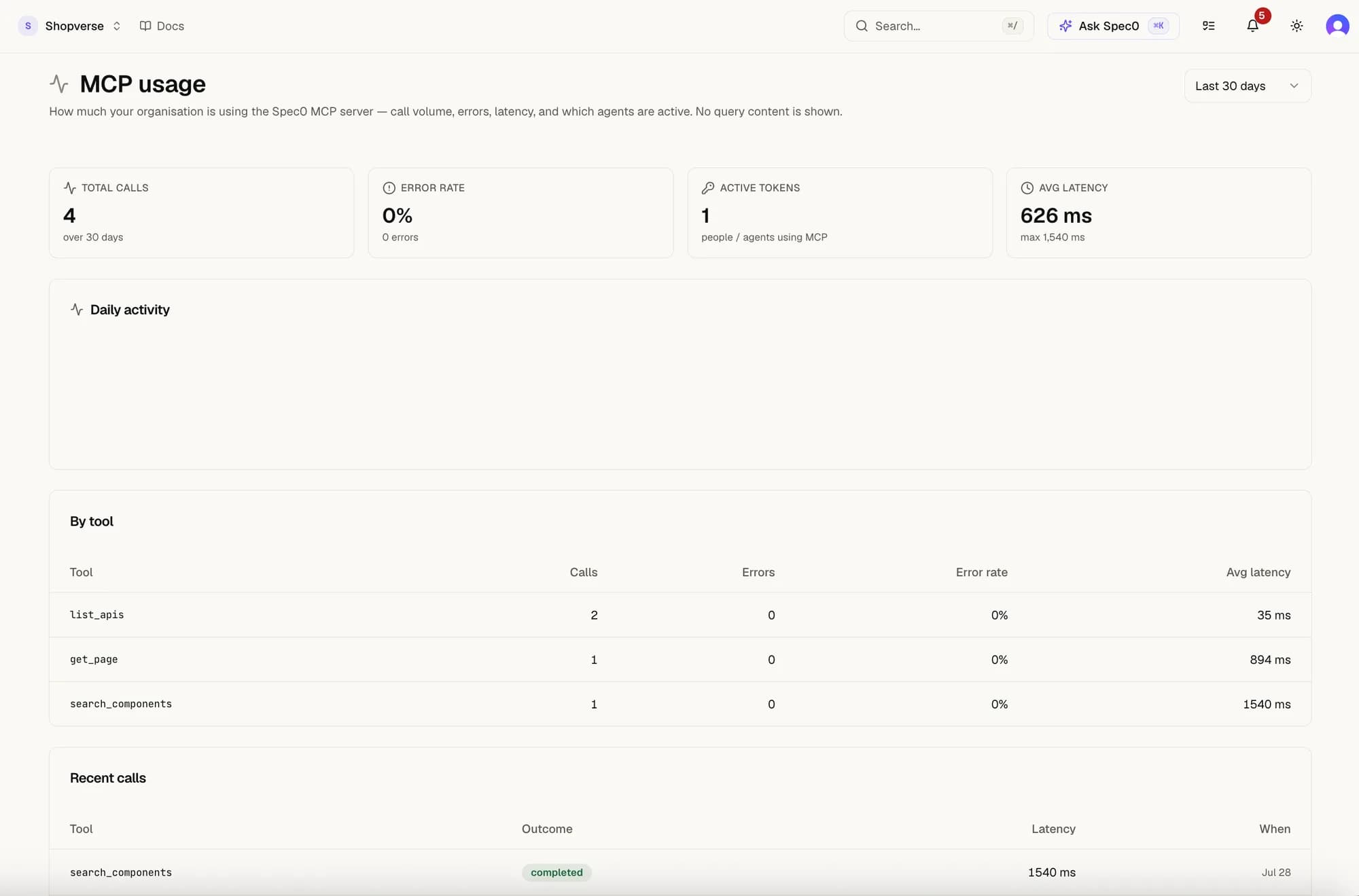
Settings → MCP usage shows call volume, error rate, latency and which tools are being used — so "we connected an agent" becomes a number you can check.
Plain-text fallback for non-MCP crawlers
If your tool doesn't speak MCP, the docs portal also serves the corpus as plain text:
https://docs.spec0.io/llms.txt— index of every pagehttps://docs.spec0.io/llms.mdx/docs/<slug>/content.md— full markdown for one pagehttps://docs.spec0.io/llms-full.txt— entire corpus in one file
These routes are stable and intended for crawling.