

APIs
The registry — versioned OpenAPI specs owned by teams, governed at publish time, mocked, subscribed to.
The APIs view is the operational centre of the platform. Every spec your org publishes, every version stream, every governance check, every mock that backs a spec, and every team consuming each API is reachable from here.
What an API is on Spec0
An API is a logical service owned by one team — identified by <org>/<name> (e.g. acme/orders). The owning team publishes specs to it and approves grants on it. That ownership is the central organising principle: who's responsible, who can publish, who decides what the contract looks like.
Every API owns a stream of specs — versioned, immutable OpenAPI documents. Publishing a new version doesn't replace the previous one; consumers can pin to any tag. See Concepts for the full mental model.
On the dashboard
| Route | What it shows |
|---|---|
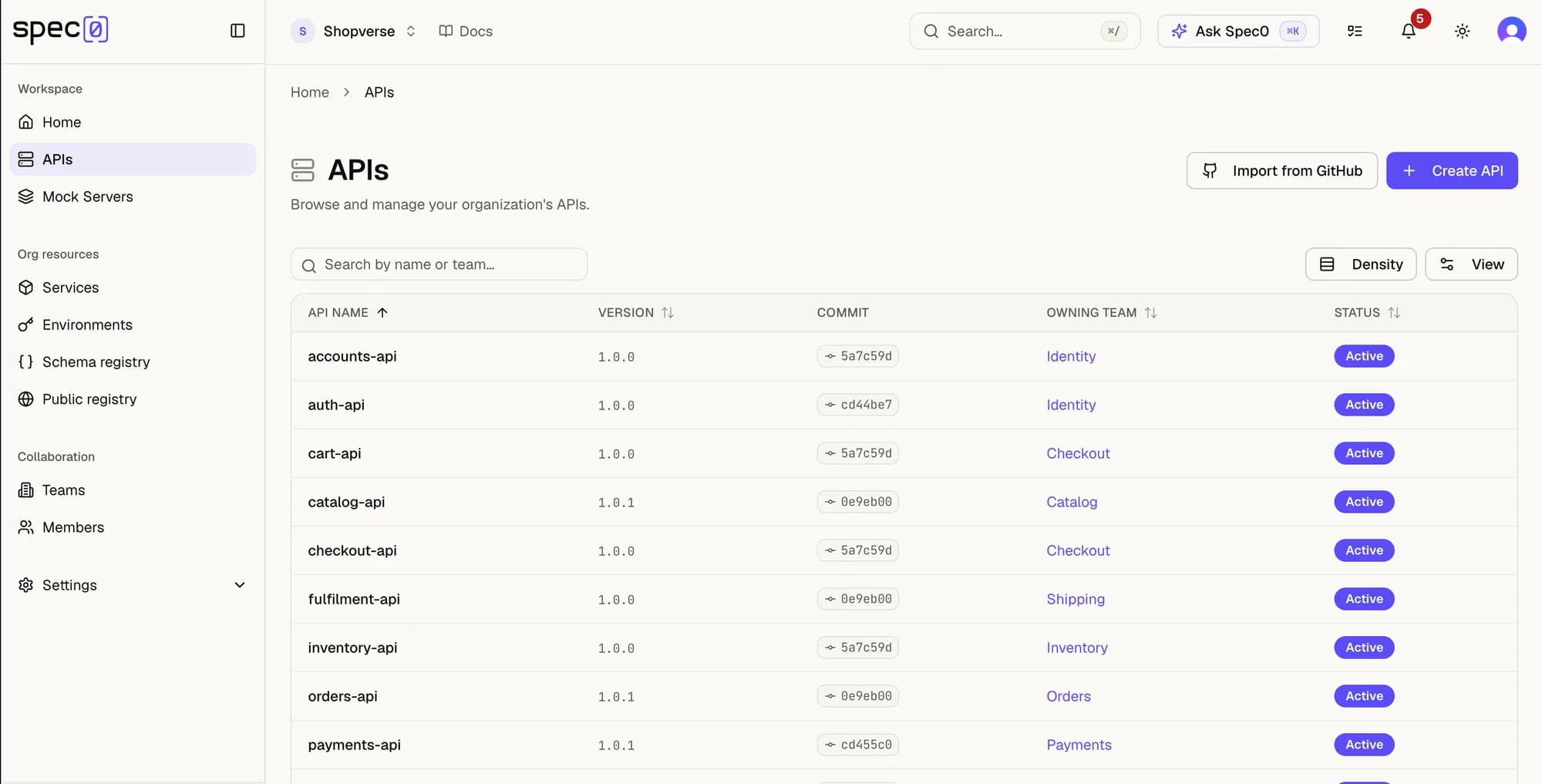
/apis | Every API your org publishes. Filter by team, status, score, breaking-change history. |
/apis/[id] | One API, all versions. Side-by-side diff against any prior tag. Spectral lint output per version. The mock URL. The list of consumers holding grants. |
/apis/new | Publish a new API, or import an existing OpenAPI document into the registry. |
The lifecycle
draft → publish → (governance gates) → versioned tag → mock provisioned → consumers notifiedEvery step except the first happens inside a transaction — a publish that fails a gate doesn't leave a partial spec behind.
Publishing
From the UI: Apis → New API → upload spec → Publish. From the CLI: spec0 publish. Both routes go through the same backend endpoint and apply the same governance.
The --semver flag (CLI) or Auto-bump version checkbox (UI) computes the right tag (patch/minor/major) by diffing against the current head — no manual version bookkeeping.
Governance gates
Per-API rulesets and policies live on the API detail page under Governance. Three layers of gate, all shipped today:
- Spectral rulesets. A drift-resistant style check. Save a custom ruleset alongside the API with
spec0 publish --save-ruleset, or upload one in the UI. - Breaking-change gate. Reject the publish if Spec0's diff reports any breaking change. Per Spec0's versioning policy, breaking changes never bump an existing API — they create a new one. Best paired with semver auto-bump for a clean upgrade story; see the block-on-breaking-changes recipe.
- Score floor. Set a minimum quality score the spec must reach before publish succeeds — the score is computed from Spectral, breaking-change history, and a few static heuristics.
--min-score Non the CLI, or Required score in the UI.
A failing gate produces a structured rejection — exit code 7 (validation failed) on the CLI, a typed error in the API response.
Versioning and discovery
| You want to | Use |
|---|---|
| List every API your org has access to | /apis UI page, or spec0 api list |
| Pull a specific version | spec0 pull <api>@<tag> |
| Pull head of stream | spec0 pull <api>@latest |
| See chronological tags | spec0 log <api> |
| Diff two versions | spec0 diff <a> <b> — works against files or registry refs |
GitOps
Every UI action has a non-interactive equivalent in spec0. The intended workflow for serious teams: own your API spec in git, gate publishes through CI (block-on-breaking-changes), tag with the commit hash, fail the build on a gate violation. The dashboard becomes the read surface; CI becomes the write surface.
Source tracking
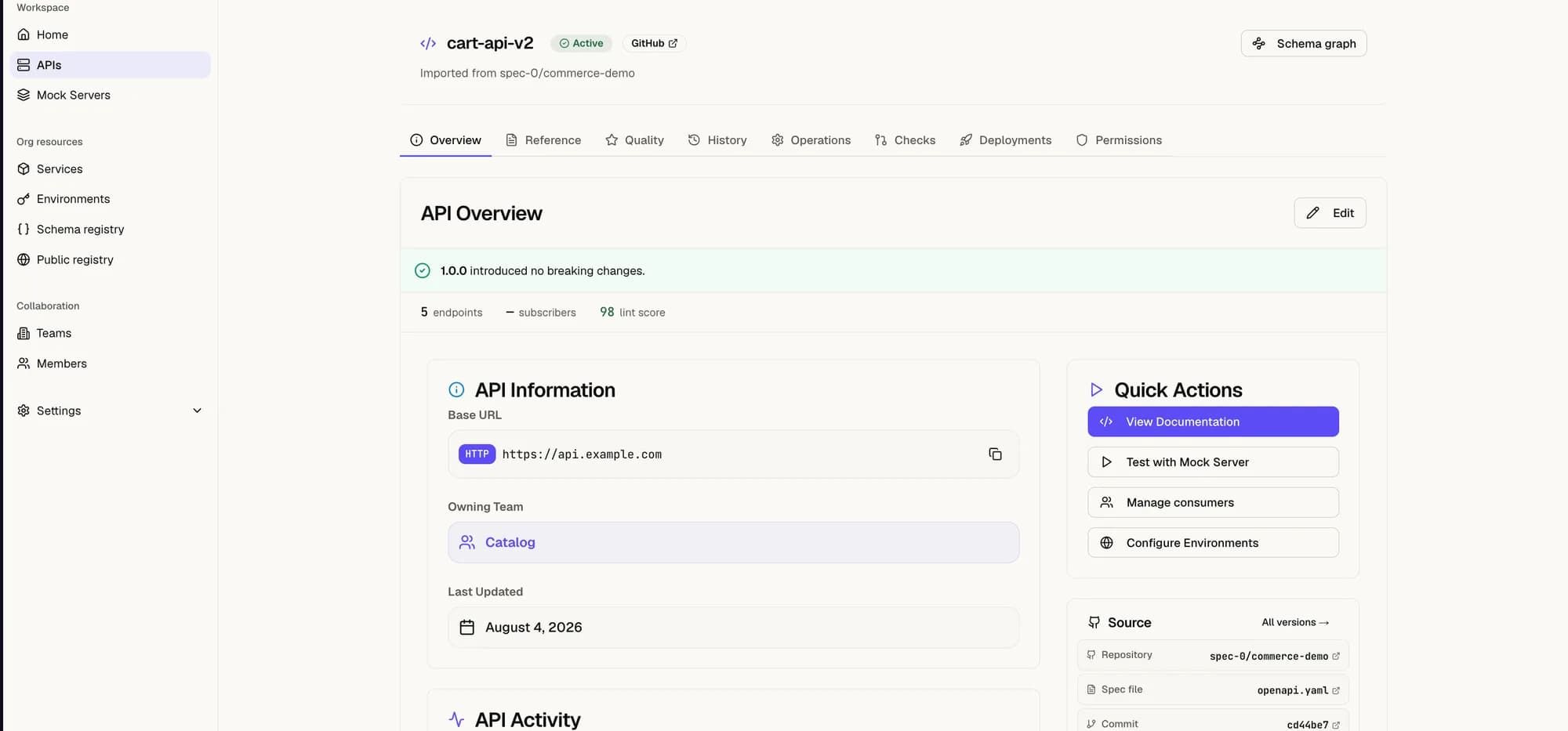
Every published version can carry the git commit it came from. The API listing and version history show a short commit chip, and clicking through opens the change on GitHub — so anyone reading the spec can jump straight to the diff that produced it.
An API's Overview collects that provenance in one place — repository, spec file, and commit — alongside the base URL and owning team:
spec0 push captures three values when they're available: the commit SHA, the GitHub repo URL, and the branch.
From CI. Standard CI runners (GitHub Actions, GitLab CI, CircleCI, Buildkite, …) check out the repo before running steps. spec0 push reads the git context automatically — no flags required:
spec0 push ./openapi.yaml --name my-apiFrom your local checkout. Same thing — running spec0 push from a working copy walks .git and attaches the current commit.
Explicit overrides. For environments where git isn't on disk (a container that received the spec by URL, an agent stitching specs together), pass the values directly:
spec0 push ./openapi.yaml \
  --name my-api \
  --git-sha abc1234 \
  --github-repo https://github.com/acme/api-specs \
  --github-branch main
GitHub is the only provider wired up today; GitLab and Bitbucket are on the roadmap. See spec0 push for the full flag set.
A mock comes for free
Every API in Spec0 can have a mock server attached — owned by the same team, scoped to the team's data. Multiple response variants per operation; conditional response selection via CEL when the request matches. Available as the OSS self-hosted artifact and as a managed SaaS offering. See Mock server for the engine.
Org boundaries
APIs are scoped to an org. A user in another org never sees your APIs in their /apis listing or a search result, regardless of similarity to a public API name. That isolation is enforced at three layers — see ADR-0010 (Hibernate @Filter) and ADR-0004 (tenant_class discriminator).
Internal dependencies across teams in one org are the Grants flow. Cross-org integrations aren't part of this surface.
What an AI agent sees
An agent with an authenticated bearer token reaches your registry over the Spec0 MCP server — one endpoint, https://api.spec0.io/mcp. Three org-scoped tools, live today:
search_apis(query, apiId?, topK?)— semantic search across your org's indexed OpenAPI specs; passapiIdto scope to one API.get_api_spec(apiId)— the full OpenAPI spec (YAML or JSON) for one of your APIs.list_apis()— every API the token's org has indexed:id,name,version, one-line summary.
Citations link back to /apis/[id] so the user can jump from the agent's answer straight into the dashboard.
MCP respects the same org boundary as the rest of the platform: the tools are scoped to the token's org, so an agent only ever sees your APIs — never another org's, regardless of who holds the token. A call with no valid token returns a structured "authentication required" message rather than leaking anything. Set it up with spec0 mcp install; see AI agents for the full config.
Where to go next
- Teams — who owns and governs.
- Grants — who depends on each API and with what permissions.
- Events — what fires when something on this page changes.
- API reference — the REST surface that drives the whole UI.
Dashboard
The home page adapts to where you are — a sample API and a getting-started checklist when you sign up, an operational view of the changes you depend on once you're connected.
Import from GitHub
Import an OpenAPI spec straight from a GitHub repository — pick the repo and spec file, confirm ownership and governance, and Spec0 publishes it and checks every pull request against it.