

Issue a Service Account Token (SAT) for a team
Create a team-scoped, non-interactive token for use by CI pipelines, AI agents, or any caller that's not a human at a terminal. Pick scopes deliberately and copy the token once — it's only shown at creation.
Create a team-scoped, non-interactive token for use by CI pipelines, AI agents, or any caller that's not a human at a terminal.
A Service Account Token (SAT) is bound to a team, not a person. It survives team-member turnover, carries the team's permissions intersected with the scopes you grant at issuance, and is the right credential for any automation that publishes specs, approves grants, or pulls from the registry on a schedule.
Prerequisites
- A team you can administer. If you haven't created one yet, see Create a team first.
- You're signed in as a Team Admin for that team, or as an Org Admin / Org Owner (who can mint tokens for any team in the org).
- A clear answer to two questions before you start, because they affect what the token can do:
- Which scopes does this token need? Pick the minimum set. See Pick scopes below for the menu.
- Should it expire? CI tokens that rotate quarterly are healthier than tokens that live forever. Default: pick a date 90 days out.
Steps
1. Open the team's tokens page
Sign in, then go to Settings → Access (/settings/access) and pick the Service account tokens tab. Personal and service-account credentials live on the same page — the tab is what separates them.
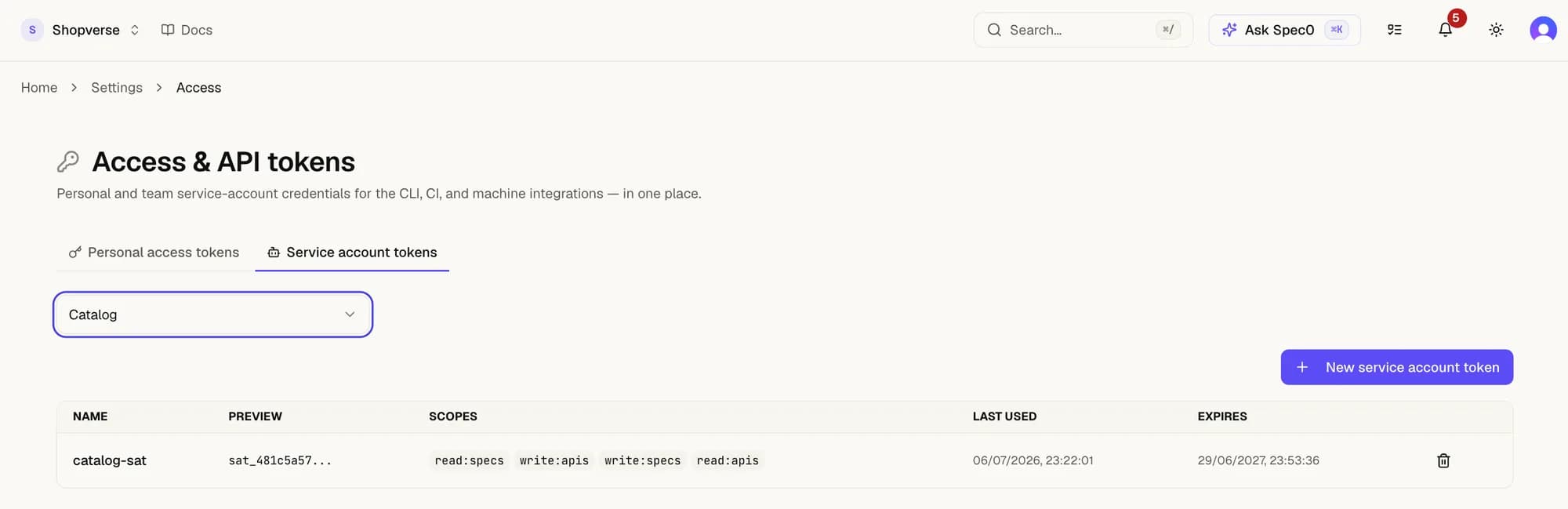
Select the team from the dropdown to see its tokens — name, scopes, last used, expiry. Brand-new teams show an empty list.
If the page is missing or the New service account token button is hidden, you don't have the team:manage permission on this team. See Common failures.
2. Click New service account token
The form asks for:
- Name — a short label that tells you (and future-you) what this token is for. Examples:
ci-publish,agent-mcp,nightly-changelog. Names are not unique; pick something searchable. - Description (optional) — one sentence on what consumes the token. Useful when revoking later.
- Scopes — a multi-select of what the token can do. See below.
- Expires at (optional) — pick a date or leave blank. Tokens without an expiry never auto-revoke; you'll have to remember to rotate. Recommended: 90 days.
3. Pick scopes
A scope is <level>:<resource>. Levels are read-only or write. Grant the minimum set — the token's effective permissions are team's permissions ∩ token's scopes, so adding scopes the team itself doesn't have grants nothing.
| Scope | What it permits |
|---|---|
read:apis | List APIs the team owns; read API metadata. |
write:apis | Create, edit, or delete APIs owned by the team. |
admin:apis | Reserved for ownership transfers. Rarely needed in CI. |
read:specs | Fetch spec versions of the team's APIs; needed for spec0 diff. |
write:specs | Publish new spec versions; needed for spec0 push / spec0 publish. |
write:public-apis | Promote an API to the public registry (spec0 publish --visibility published). Separate from write:apis — public publishing is a deliberate escalation. |
read:subscribers / write:subscribers | List or approve grants on the team's APIs. |
read:mocks / write:mocks | Read or configure the team's mock servers. |
admin:team | Manage the team itself — mint tokens, add/remove members. Don't grant this to a CI token; it's a key-to-the-kingdom for the team. |
Common recipes:
- CI that publishes specs:
read:apis read:specs write:apis write:specs. Addwrite:public-apisonly if the same job promotes the API to the public registry. - CI that only checks breaking changes:
read:apis read:specs— read-only, can't accidentally publish. - MCP / AI agent: start with the read set; add write scopes only for the specific tasks the agent owns. An agent that "drafts spec changes for human approval" probably doesn't need
write:specs— it can return a diff for the human to apply.
What you cannot grant via a team-scoped SAT: admin:org (org-wide admin). That's reserved; if you need it, the request fails at issuance.
4. Create and copy the token
Submit the form. The token appears once — a long opaque string starting with spec0_sat_. Copy it immediately into:
- The GitHub Actions Environment secret it belongs to (
SPEC0_TOKENis the canonical name). - Your local password manager, if a human needs to use it.
- Wherever the consumer reads tokens from.
If you close the modal without copying, the token is gone and you'll need to create a new one. Revoking the un-copied one is good hygiene but not security-critical — without a copy, no one (including you) can use it.
Use the token
In CI (GitHub Actions example):
env:
  SPEC0_TOKEN: ${{ secrets.SPEC0_SAT_CI_PUBLISH }}
  SPEC0_ORG_ID: ${{ vars.SPEC0_ORG_ID }}
steps:
  - name: Publish spec
    run: |
      npm i -g @spec0/cli
      spec0 publish openapi.yaml --semver
From a local script (less common; prefer PATs for human use):
export SPEC0_TOKEN="spec0_sat_..."
export SPEC0_ORG_ID="..."
spec0 api list
In an AI agent over MCP, the same token works — see the agents page.
Verify
In the tokens list:
- Your new token appears with the name you gave it.
- The scopes match what you selected.
last_used_atis empty until the first request lands.- Once you've fired a request from CI,
last_used_atupdates within a few seconds.
A quick smoke from your terminal:
SPEC0_TOKEN="spec0_sat_..." SPEC0_ORG_ID="..." spec0 api list200 OK and a list of the team's APIs means the token is wired correctly.
Rotate or revoke
Each row in the tokens table has a Revoke button. Revoking is instant — the next request fails 401. To rotate without downtime:
- Create a new token with the same scopes.
- Update the CI secret / agent config to use the new token.
- Wait one cycle (or watch
last_used_aton the old token stop advancing). - Revoke the old token.
There's no "edit scopes on existing token" — rotate instead. This is by design; a token's scopes are part of its identity.
Common failures
| Symptom | Cause | Fix |
|---|---|---|
| New service account token button missing | You're a Team Member, not Team Admin. SATs need team:manage. | Ask a Team Admin or Org Admin to mint it, or to promote you. |
403 Forbidden — User org ≠ Resource org | The token's org differs from the resource you're acting on. | Confirm SPEC0_ORG_ID matches the token's org. Tokens are not cross-org. |
403 Forbidden — User is not in same team as the API resource | The token is for Team A; you're acting on Team B's API. | Mint a separate token from Team B, or have an Org Admin perform the action. |
403 Forbidden — User lacks required permission: write:specs | The scope was missing at issuance. | Create a new token with write:specs included. Scopes can't be added after issuance. |
| Token works locally but fails in CI | CI environment is missing SPEC0_ORG_ID or SPEC0_TOKEN, or the secret is empty. | Confirm both are set on the workflow's environment: block, not at repo level (unless that's where you put them). |
401 Unauthorized — token expired | Past the expiry date you set. | Create a new token; update the consumer; revoke the expired one. |
Next
- Use the CLI in CI — wire the token into a publish workflow end-to-end.
- Block PRs on breaking changes — a common read-scope-only token use case.
- Access control reference — when a 403 surprises you, the reference explains which of the five decision steps rejected the request.