

Governance
Org-level API governance in Spec0 — Spectral linting rulesets plus five publish-time policy gates (naming, breaking-change, required fields, versioning, spec sources).
API governance in Spec0 is configured per organisation under Settings → API governance. Two things live there:
- Spectral linting rulesets — the standards
spec0 lintchecks against. - Publish-time policy gates — five rule types evaluated server-side on every publish, each with its own enforcement mode.
Publish-time policy gates
Five policy sections are evaluated on every publish, before the spec is stored. Each carries its own enforcement mode, and absent sections default to OFF.
| Section | What it checks |
|---|---|
| Breaking change | Compares against the previously published spec using oasdiff and flags breaking changes. |
| Naming | operationId patterns, path-segment casing, schema casing. |
| Required fields | Fields a spec must define (descriptions, contact, licence, and similar). |
| Versioning | Semver discipline in info.version and /v<major> path-prefix requirements. |
| Spec sources | Restricts where specs may be published from — Git-backed CI, CLI, or manual upload. |
Enforcement modes
Every section takes one of three modes:
| Mode | Behaviour |
|---|---|
OFF | Not evaluated. The default for any section you haven't configured. |
WARN | Evaluated and surfaced at publish time, but the publish succeeds. |
BLOCK | Evaluated and the publish is rejected if the rule fails. |
Configure them under Settings → API governance. Modes are per-section, so you can block on breaking changes while only warning on naming.
Governance policy is currently org-wide — one policy applies to every API in the organisation. Per-team and per-API overrides are not available yet.
What a rejected publish looks like
When a BLOCK section fails, the publish is rejected before anything is written:
- HTTP —
422 Unprocessable Entity. - Message —
Publish blocked by org governance policy:followed by each blocking violation as[section] message, semicolon-separated. Example:Publish blocked by org governance policy: [breakingChange] This version introduces breaking changes versus the previously published spec. Publish a major version, or relax the breaking-change policy. - CLI exit code —
7(validation failed), since the CLI maps422to its validation code. That makes it directly usable as a CI gate:
# Fails the build when the org policy blocks the publish
spec0 publish ./openapi.yaml --name my-api --semver
Sections in WARN mode don't affect the exit code — violations come back alongside a successful publish and are recorded in the server log.
The breaking-change gate fails open. If the diff engine is unavailable or the comparison errors, the check is skipped and the publish proceeds rather than being blocked by an infrastructure problem. A breaking change must be positively detected to block a publish — so treat the gate as a strong guardrail, not a proof of compatibility, and keep the CI-side check as well.
Spectral rulesets
Spec0 lets an org define and manage Spectral rulesets centrally, so every team lints against the same standards. Built-in rulesets (spectral:oas, spectral:asyncapi, spectral:arazzo) are always available; custom org rulesets require a Pro plan.
Managing rulesets
From Settings → API governance → Spectral rulesets you can create, edit, preview, and delete named rulesets.
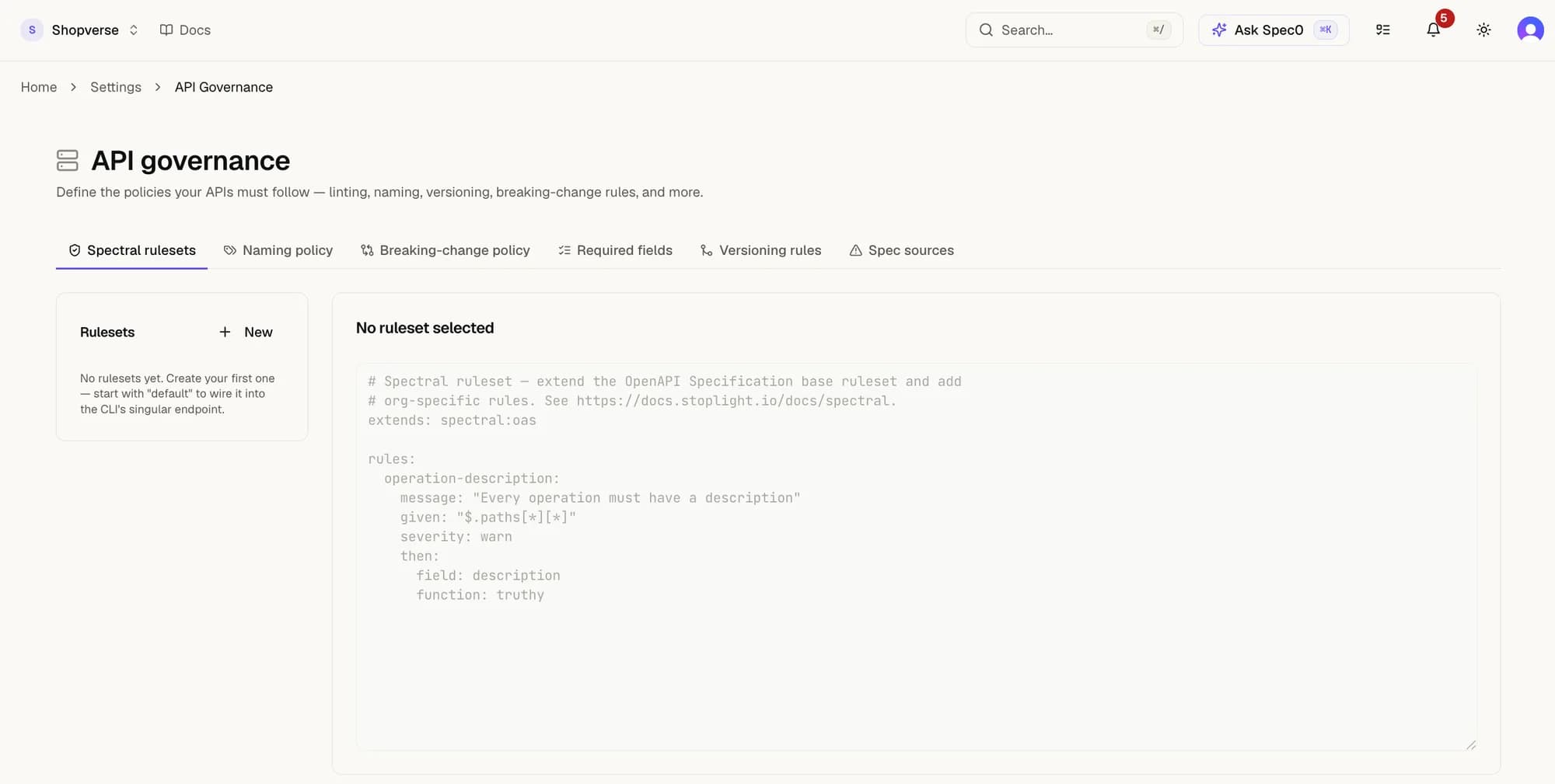
Name the first one default: that is the ruleset the CLI's singular ruleset endpoint and per-API ORG_CUSTOM selection both resolve to. Create it under any other name and your APIs keep linting against the built-in set.
Linting against them from the CLI
The rulesets you configure are what spec0 lint uses:
# Lint against your org's configured ruleset
spec0 lint ./openapi.yaml --org-ruleset

# Lint against a specific local ruleset file
spec0 lint ./openapi.yaml --ruleset ./my-rules.yaml

# Upload a local ruleset as the org config (Pro)
spec0 lint ./openapi.yaml --save-ruleset ./my-rules.yaml
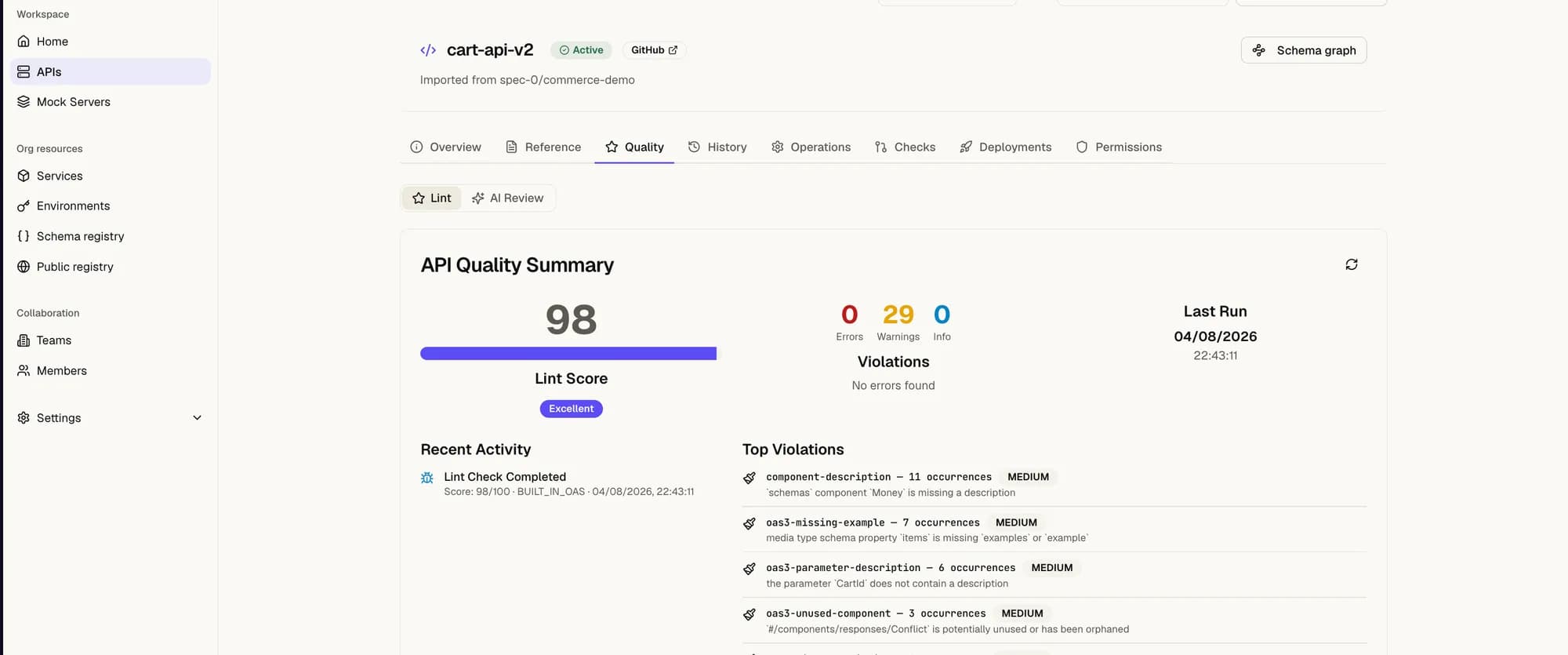
spec0 lint reports a quality score and findings. In CI, use --min-score <0-100> or --strict to fail the build (exit code 7) when a spec falls below your bar:
spec0 lint ./openapi.yaml --org-ruleset --min-score 80The same result is on each API's Quality tab, grouped by rule rather than by line:
How linting relates to publishing
Lint score is not one of the publish-time policy gates — spec0 push / spec0 publish don't run the org ruleset for you. Run spec0 lint in CI before you publish to gate on lint quality yourself. The same lint score surfaces to agents via the get_api_health MCP tool.
The five sections above are enforced at publish time; lint quality is not. That split is deliberate for now — the gates check structural properties of the spec, while lint score is a graded quality signal.
See also
spec0 lint— the CLI surface for rulesets and scoring.- Versioning — how breaking changes are detected and recorded.
- APIs — the registry and publishing flow.