

Schema registry
Every component schema across your APIs' latest versions — searchable down to field names, deduplicated by shape, and explorable as an interactive graph per API.
The Schema registry answers the questions your specs contain but don't surface: which
APIs carry a tax_id field, what does this payload reference, and where else does this
exact shape live. It sits in the sidebar as its own section and reads from every API's
latest published version — no setup, schemas appear automatically when APIs are
published.
The directory
Schema registry in the sidebar opens the directory: one row per component schema across your org's APIs, with its API, version, field count, and how many operations carry it.
Search matches schema names and field names. Typing tax_id finds every schema — in
any API — that declares that property, even deeply nested. That makes the directory the
fastest way to trace a field across team boundaries.
Same shape, different places
Schemas are compared by their resolved shape, not their text. Renaming a component,
reordering keys, inlining a $ref, or reformatting the file doesn't change the comparison
— if two schemas describe the same structure, the registry knows.
Rows with a ×N chip mean the exact shape exists in N places. The schema's page lists its twins with links, so before changing a "shared" shape you can see every API that carries a structurally identical copy — and after a change, where drift just appeared.
Schemas are compared, never shared: an API's spec can only reference its own components. The registry surfaces sameness across APIs; it doesn't create coupling between them.
A page per schema
Every schema is addressable as {api}/{SchemaName} and its page shows:
| Section | What it answers |
|---|---|
| Fields | The schema's properties with types, requiredness, and descriptions. |
| Raw definition | The verbatim JSON subtree, with one-click copy. |
| Used by | The operations (method + path) whose requests or responses carry this schema — the blast radius of a change. |
| Referenced by | Sibling schemas in the same API that reference this one. |
| Same shape | Structurally identical schemas in other APIs, linked. |
Tags and domains
Schemas carry tags — plain labels you assign, like payments or shipping. Anyone who
can manage an API can tag its schemas, from the schema's page. Tags normalise on save, so
Payments, payments and payment all become one tag rather than three.
A domain is then simply a name over a set of tags. Create one under Domains, pick the tags it groups, and every schema carrying any of those tags belongs to it — across APIs, without anyone maintaining a membership list. The domain page shows which tag put each schema there, so membership always explains itself, and re-tagging one schema never means editing a domain.
Domains are deliberately not inferred from your specs. We checked: every API in a typical org
shares the same ubiquitous shapes (Error, Money), so grouping by shared shapes collapses an
org into one blob — while the shapes that genuinely indicate a domain appear in only two or
three APIs. A label you chose beats a cluster you'd have to audit.
Tags are assigned in the app today. Declaring them in the spec itself — so they're version-controlled and land via CI — is the natural next step.
The graph explorer
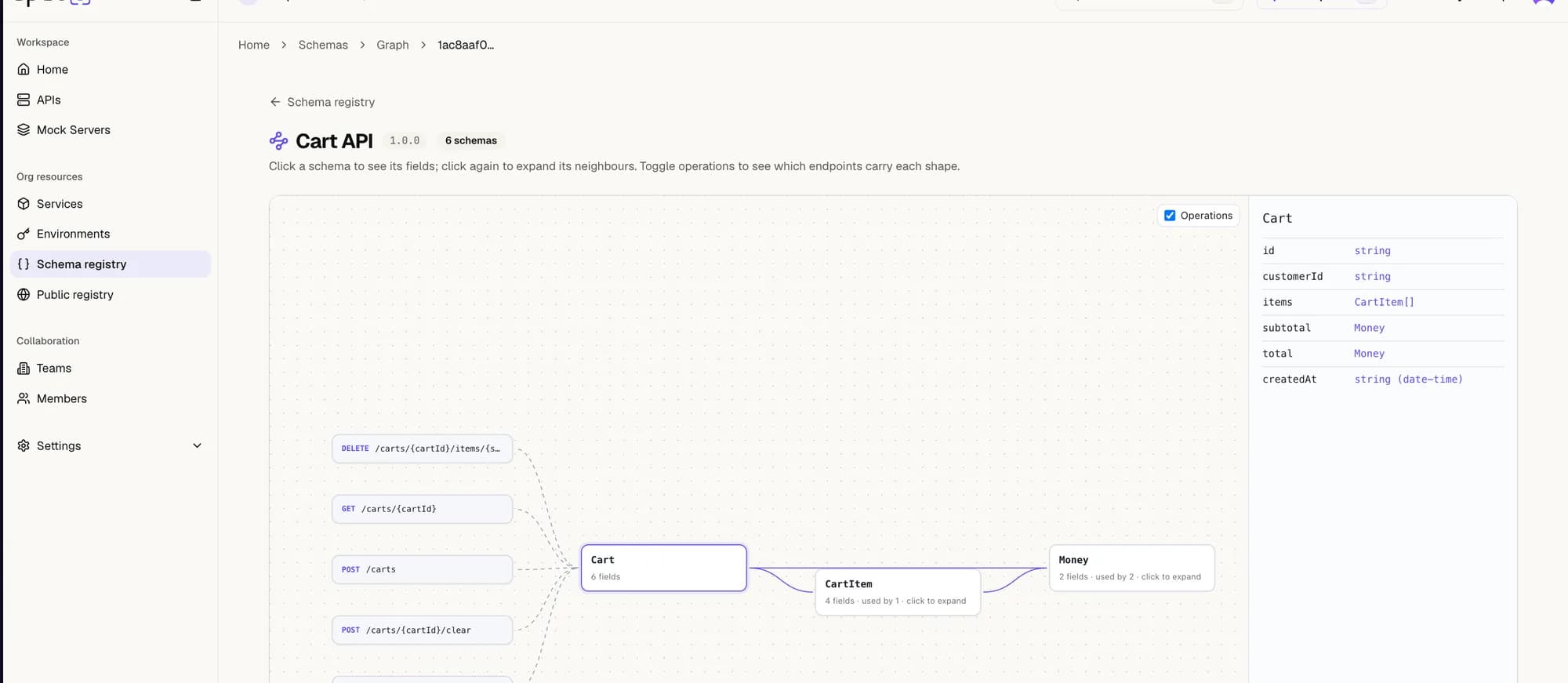
Any API can be opened as a drawing board: its schemas laid out as a graph, $ref
relationships drawn as edges.
- The view opens on the most connected schema and shows one hop of neighbours — large APIs stay readable because the graph discloses itself progressively.
- Click a schema to see its description and fields in the side panel; click again to expand its neighbours.
- Toggle operations to add endpoint nodes and see which operations carry each shape.
You can reach the explorer from the directory (the graph icon on any row), from a schema's page (Open in graph, which lands focused on that schema), and from an API's header (Schema graph).
What an AI agent sees
Agents connected over MCP read the registry through three tools, so they can answer shape questions without downloading a spec:
| Tool | Answers |
|---|---|
list_schemas | "Which of our APIs carry a tax_id field?" — the index, searchable by schema and field name, filterable by tag. |
get_schema | "What fields does Order have?" — the resolved shape, the operations that carry it, its twins. |
get_schema_impact | "Who breaks if I change this?" — affected operations, the API's consumer teams and their grant status, and identical shapes elsewhere. |
get_schema_impact is the one an agent cannot approximate by reading specs: consumers come
from the grant graph, not from any document.
Where to go next
- APIs — the publishing flow the registry reads from.
- Versioning — what "latest version" means here.
- Governance — quality checks that run on the same publishes.
Environments
How an API can live in more than one environment at once — staging on one version, production on another — and how you publish a spec to each.
API graph
Your organisation's APIs and the relationships between them — ownership, consumption and shared shapes — drawn from what teams already publish.