

Local MCP server
Let AI coding agents on your computer, such as Claude Code or Cursor, ask Studio about the APIs in your library.
MCP (the Model Context Protocol) is a standard way for AI agents to call tools that other programs provide.
Studio can run a small MCP server on your computer. A coding agent, such as Claude Code or Cursor, can then ask Studio about the APIs in your library: what operations they have, what a request looks like, and which environments you use. This includes specs you have only on your computer and haven't published anywhere.
The server is off by default. Nothing listens until you start it.
Turning it on
- Open the MCP tab in the top bar, or go to Settings → MCP (
⌘,, orCtrl+,on Windows and Linux). - Choose Start.
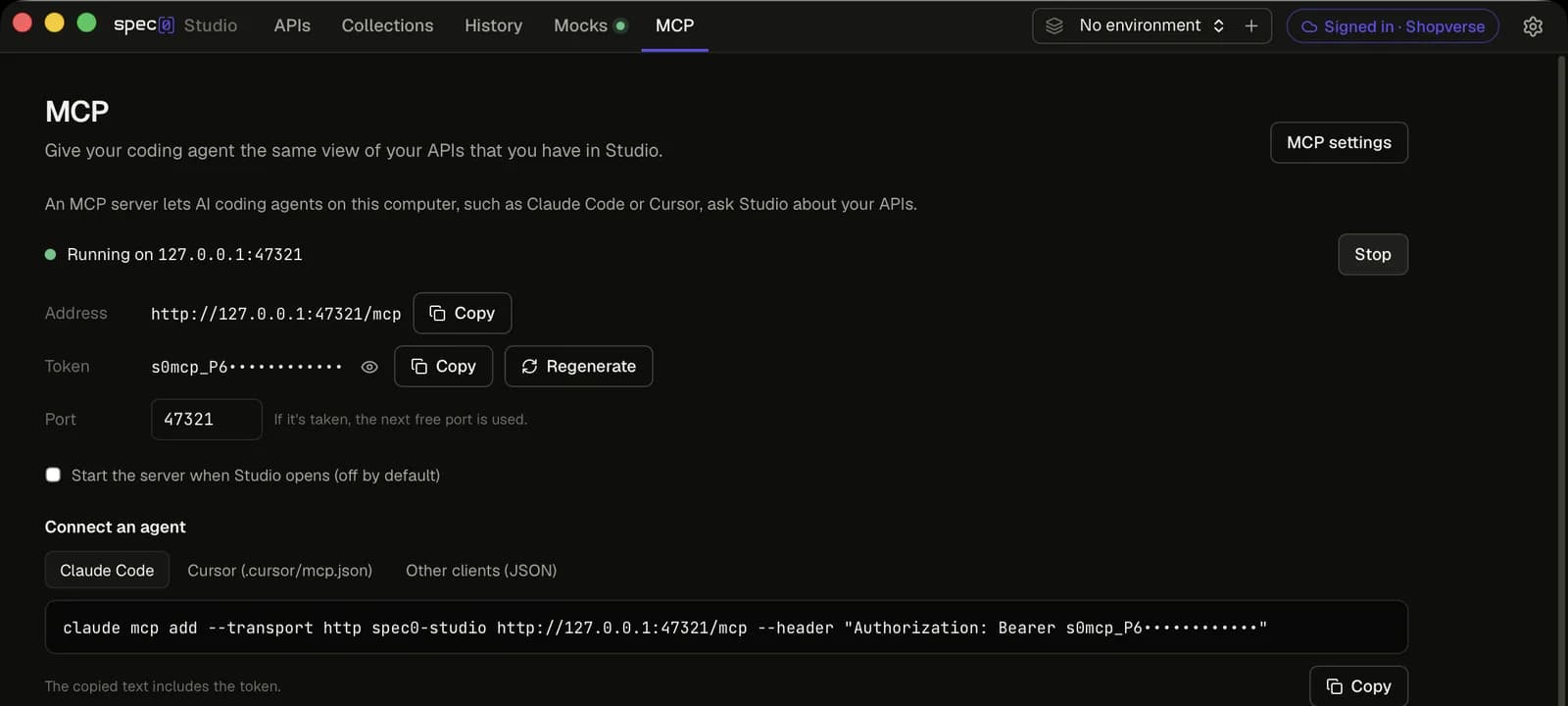
The panel then shows:
- Address:
http://127.0.0.1:47321/mcp. If port 47321 is taken, Studio uses the next free port and tells you, so you can update your agent's settings. You can also choose a port. - Token: a secret the agent sends with every request. It is hidden until you choose to show it.
- Connect an agent: setup text for Claude Code, Cursor and other clients, ready to copy.
To stop the server, choose Stop. To have it start whenever Studio opens, tick Start the server when Studio opens. That is off by default too.
Connecting an agent
Copy the setup text from the panel. It already has your address and token in it. The examples below
show the same text with <your token> in place of the token. If Studio moved to another port, use
the address the panel shows.
Run this in a terminal:
claude mcp add --transport http spec0-studio http://127.0.0.1:47321/mcp --header "Authorization: Bearer <your token>"Add this to .cursor/mcp.json:
{
  "mcpServers": {
    "spec0-studio": {
      "url": "http://127.0.0.1:47321/mcp",
      "headers": {
        "Authorization": "Bearer <your token>"
      }
    }
  }
}
Most MCP clients accept a JSON file in this shape:
{
  "mcpServers": {
    "spec0-studio": {
      "type": "http",
      "url": "http://127.0.0.1:47321/mcp",
      "headers": {
        "Authorization": "Bearer <your token>"
      }
    }
  }
}
The copied text contains your token. Don't commit it to a repository or paste it anywhere public.
What it looks like
Here Claude Code, connected to Studio's MCP server, lists the APIs open in Studio and writes a curl command for the Orders API's hosted mock, with the key left as an environment variable:
What agents can ask for
The MCP tab lists these tools. The ones marked sign-in work only while Studio is signed in to Spec0.
| Tool | What it does | |
|---|---|---|
list_local_apis | Lists the APIs in your Studio library: title, version, where each came from, number of operations, base URLs, and whether it has a hosted mock. | |
get_api_spec | Returns the OpenAPI document for one API, exactly as stored. Large documents come back in parts. | |
get_operation | Returns one operation: parameters, request body schema, responses, security schemes, and the full URL for each server (and for the mock, if there is one). | |
search_operations | Searches the operations of the APIs in your library by path, operationId, summary, tag and description. | |
get_connection_status | Says whether Studio is signed in to Spec0 or working locally, and gives the organisation name and the address of the remote Spec0 MCP server. | |
list_environments | Lists your environments, which one is active, and each variable's name. Values are included for ordinary variables only. | |
get_mock_server | For one API: the hosted mock's address, its key (if Studio has it), the header to send it in, the spec version it was built from, and a curl command. | sign-in |
create_mock_server | Creates a hosted mock for an API that is already published to Spec0. If the API already has one, returns that one. | sign-in |
refresh_mock_server | Rebuilds an API's hosted mock from the latest version on Spec0. The address and key stay the same. | sign-in |
Studio doesn't send requests for the agent. The agent gets a URL, such as a server or mock
address from get_operation, and calls it itself, for example with curl.
An API that is only on your computer has to be published from Studio before an agent can create a mock for it. See Hosted mock servers.
Security
The server is built to be reachable only by programs on your computer that you gave the token to.
- Local only. It listens on
127.0.0.1, so other computers on your network can't reach it. - Token required. Every request must carry the token as
Authorization: Bearer <token>. The token is generated on your computer. A request without it, or with the wrong one, is refused. - New token at any time. Regenerate makes a new token. Agents using the old one stop working until you give them the new setup text.
- No web pages. Requests from a browser are refused, so a website you visit can't reach the server, even though it runs on your computer.
- Only while Studio runs. The server stops when you stop it or when Studio quits.
- Secret values stay secret. Variables you marked secret are listed by name only. Their values are never shared. If an agent needs one, it has to ask you.
Local and remote MCP servers
Spec0 has two MCP servers. They answer different questions.
| Studio's local MCP server | The Spec0 MCP server | |
|---|---|---|
| Knows about | What's in Studio on your computer: your library, including unpublished specs, and your environments | Your whole organisation's APIs on Spec0, plus the public Spec0 docs |
| Runs | On your computer, while Studio is open | Hosted by Spec0 |
| Needs a Spec0 account | No, except for the mock server tools | Yes, for your organisation's APIs |
You can use both at once. Use the local server while you work on a spec on your computer, and the remote one to search every API in your organisation. See Spec0 MCP server for how to set up the remote one.