

Collections
Run a sequence of requests, across one or more APIs, with every step checked against its own spec.
A collection is a list of steps that run in order, such as create an order, get it, then pay for it. Each step points at an operation in one of your specs, so its response is checked against that spec. One collection can use several APIs.
This page covers building a collection. The other pages in this section cover passing values between steps, running and run logs, files and git, and importing from Postman.
How collections differ from other clients'
In most API clients, a collection holds its own copy of each request. In Studio, a step holds only its own values (parameters, headers, body, and where to send it) and points at the operation in the spec for everything else. So:
- each step's response is checked against its spec, like any other request
- when a spec changes, Studio can tell you which steps no longer match it
- the spec stays the one place the API is described
Create a collection
Open Collections in the top bar and press +, or choose Add to collection ▸ New collection… on an operation. Studio asks for a name first.
To rename a collection, click its name in the header. Right-click a collection in the list for Rename… and Delete…. Deleting asks first.
Add steps
Open an API and fill in the request the way you want it in the collection: parameters, body, and target.
Right-click the operation in the list (or press Shift+F10) and choose Add to collection ▸
and the collection.
Repeat for each step. The steps can come from different APIs.
The step is added with what you had filled in and where it was aimed. A request in History can be added too, with Add to a collection; it keeps the values it was sent with.
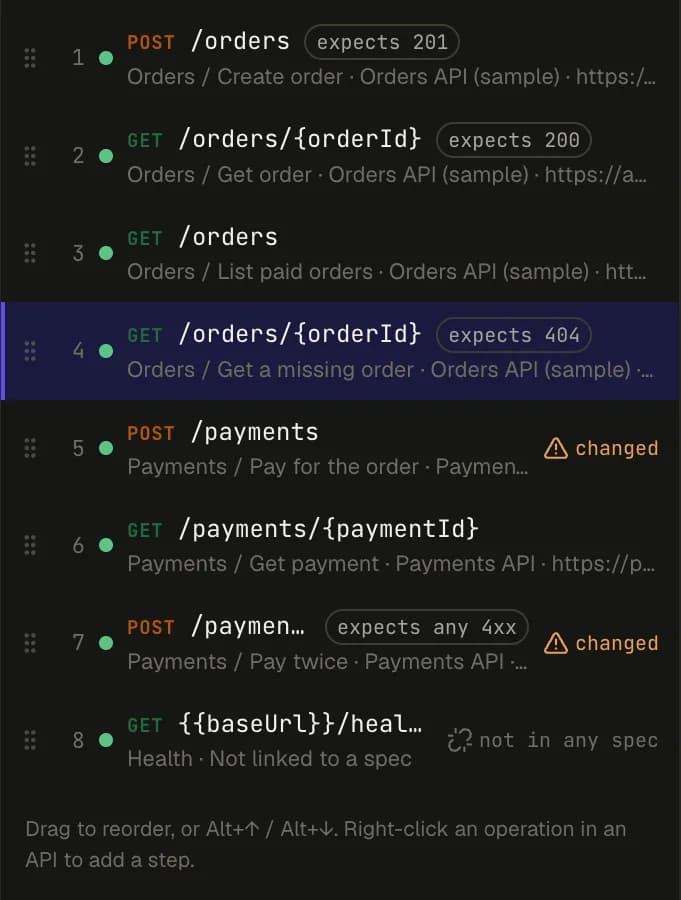
Edit a step
Select a step to edit it. Its header has:
| Field | What it's for |
|---|---|
| Key | The step's name in references, such as createOrder in {{steps.createOrder.body.id}}. |
| Name | A readable name, shown in the list and in run logs. |
| Expects | The status that counts as a pass. Empty means any 2xx. See Expected status. |
| Send to | Where this step goes: one of the API's servers, its hosted mock, its local mock, or a URL you type. |
Below that, Request holds the step's inputs, in the same editor as any other request, and Response shows its last response.
Each step has its own target. So one step can call a real staging server while the next calls a local mock of an API that doesn't exist yet. A step aimed at a local mock needs that mock to be running; Studio doesn't start it for you, and the step says so.
Reorder and remove steps
- Drag a step, or use
Alt+↑andAlt+↓. - The step menu (right-click a step, or its ⋯ button) has Change operation…, Take a value from an earlier step…, Duplicate, Move up, Move down and Remove step.
- Delete removes the selected step while the step list has focus. Undo puts it back.
If later steps take values from the step you're moving or removing, Studio says which links would break and asks first.
Steps, Chain and Runs
The collection header has three views:
| View | What it shows |
|---|---|
| Steps | The step list and the selected step's request and response. |
| Chain | How values pass from step to step. See Passing values between steps. |
| Runs | The last 20 runs and their logs. See Running a collection. |
When a spec changes
Studio compares each step with the current spec. A step that no longer matches is marked changed, and the step says what changed, for example:
- the operation moved or was renamed
- a parameter the step sets was removed, or a new one became required
- the body is missing a field the spec now requires
- the server the step targets is no longer in the spec
A step whose operation is gone can be pointed at another one with Change operation….
Steps that aren't in a spec
A step can also be a plain request with a URL, not linked to any operation. This happens when you import a request that matches no spec in your library. It's marked not in any spec. It runs, but its response isn't checked. Link to an operation… in the step menu links it once you've added the API.
Good to know