

Console and logs
See what Studio did in this session, from requests to collection runs, local mock traffic and MCP calls, in one place.
The console is a live log of this session: every request as it's sent and answered, collection runs, requests to your local mocks, and calls from coding agents. Use it to see what happened when something doesn't look right.
Open the console
Press Console in the status bar at the bottom of the window, or ⇧⌘Y (Ctrl+Shift+Y on
Windows and Linux). A badge on the button counts errors that arrived while the console was closed.
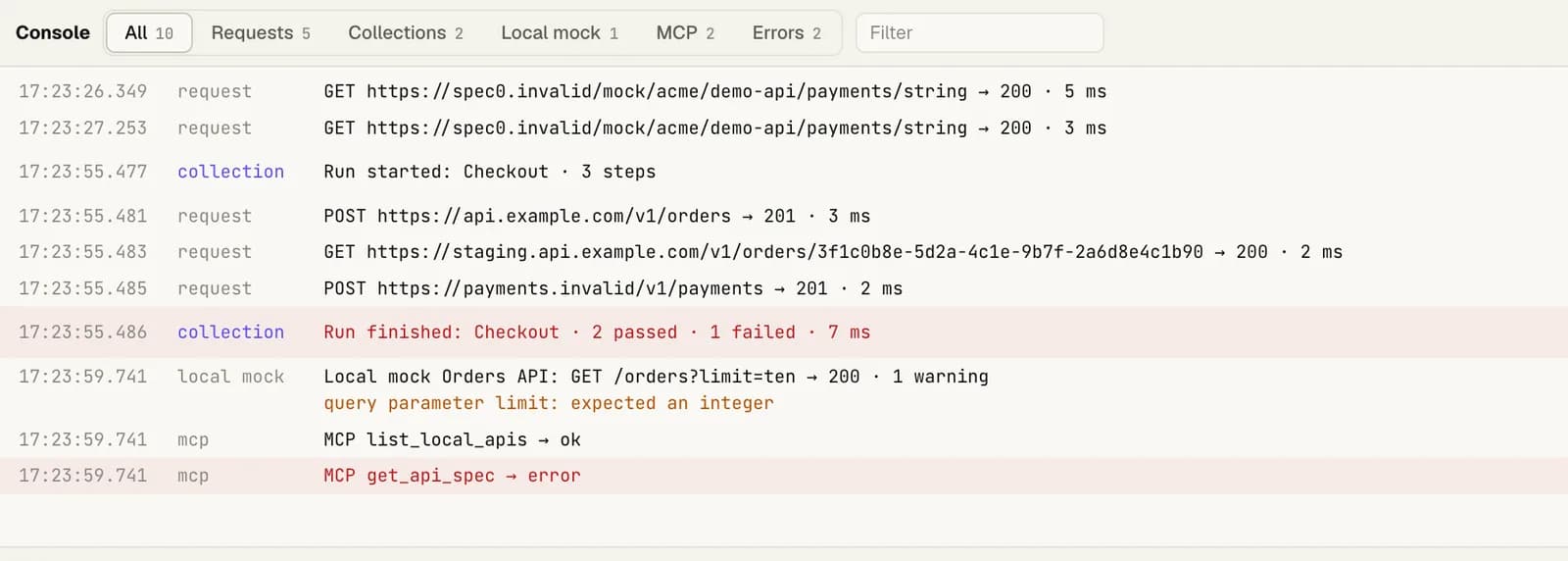
What it shows
| Kind | What's recorded |
|---|---|
| Requests | Method, URL, status and time. |
| Collections | Each run starting and finishing, with Open log to jump to its run log. |
| Local mock | Each request a local mock answered: method, path, status, and any warnings about the request. |
| MCP | Each tool a coding agent called through the MCP server, and whether it worked. Never its arguments. |
Filter by kind, show only Errors, or type in Filter to search. Copy copies what's shown; Clear empties it.
Good to know
- The console is kept in memory only, and is gone when Studio quits. It's never saved or sent anywhere.
- It keeps the last 1,000 entries.
- Secret values are replaced by their
{{name}}.
Other logs
| Log | Where | Kept for |
|---|---|---|
| History | History in the top bar | 30 days |
| Run logs | Runs in a collection | The last 20 runs per collection |
| Console | The status bar | This session |
All of them stay on your computer.
Was this helpful?