

Importing from Postman
Turn a Postman collection into a Studio collection, with each request linked to an operation in your specs.
Studio can import a Postman collection (v2.1 or v2.0, exported as JSON) and turn it into a Studio collection. Each request is matched to an operation in your specs where it can be, so its response is checked against the spec from then on.
Import a collection
Add the APIs the collection calls to your library first, so there's a spec to link each request to.
In Postman, export the collection as Collection v2.1.
In Studio, open Collections and choose Import…, or drop the file on the Collections tab.
Read the summary, choose what to do with the collection's variables, and press Done.
The Postman collection becomes one Studio collection. Folders are flattened in order, and each step is named after its folder and request, such as "Orders / Create order". It's one collection rather than one per folder because a Postman collection is usually run from top to bottom, and a value set in one folder is often used in the next.
How requests are linked
Each request is matched to an operation in your library by its method and path, against each spec's servers:
- Host matches. The host matches a server in a spec. The step is linked to that operation,
and targets that server. A
{{baseUrl}}is resolved from the collection's variables where it has a value. - Host unknown. The host is a variable with no value, or on your own computer (
localhost). The path decides on its own. The step keeps Postman's address as its target. - Host doesn't match. No spec declares that host, and Studio doesn't guess. The request is kept as a plain request.
- Several matches. A literal path segment beats a placeholder, so
/pet/findByStatuswins over/pet/{petId}. A request that still matches operations in more than one API stays unlinked, and its note says which APIs.
Requests that aren't linked are kept as plain requests, marked not in any spec. They run, but their responses aren't checked. Add the API later and use Link to an operation… on the step.
What comes across
| From Postman | In Studio |
|---|---|
| Headers, query and path values | The step's parameters and headers. On a linked step, query parameters the spec doesn't declare are left out, and the step's note says so. |
| Raw bodies (JSON, text, XML) | The step's body |
| Form and multipart bodies, including files | Form fields and parts. File parts keep their path, with a note to check it. |
| GraphQL bodies | A JSON body with query and variables |
| Bearer, basic and API key auth, including inherited auth | The spec's matching security scheme where there is one, otherwise a header or query parameter. Values are always {{variables}}. |
| Collection variables | An environment you can choose to create |
| A test that checks the status | The step's expected status |
| A script that saves a response value for a later request | A link in the later steps that use it |
For example, pm.environment.set("orderId", pm.response.json().id) in the "Create order" request
becomes {{steps.createOrder.body.id}} in each later step that used {{orderId}}. A variable is
converted this way only when exactly one step sets it, from a response, and a later step uses it.
Otherwise it stays a {{variable}}, and the summary says why.
Secrets are never copied in
Tokens, passwords and API keys typed into Postman are never written into the collection. This
covers auth values, credential headers, secret-looking query and form fields, and "password" in a
JSON body. Each one becomes a {{variable}}.
The summary then offers to create an environment with the collection's variables and these secret values, and make it active. You can leave the secret values out; those variables are then created empty. Secret values go into your system's credential store, like any other.
The summary
After the import, a summary shows what happened:
- how many requests were linked to a spec (per API), and which weren't, with the reason
- status checks that became expected statuses
- variables that became links to earlier steps, and variables that stay variables
- anything else worth knowing, such as Postman's generated values (
{{$guid}}), which Studio doesn't support - the environment choice
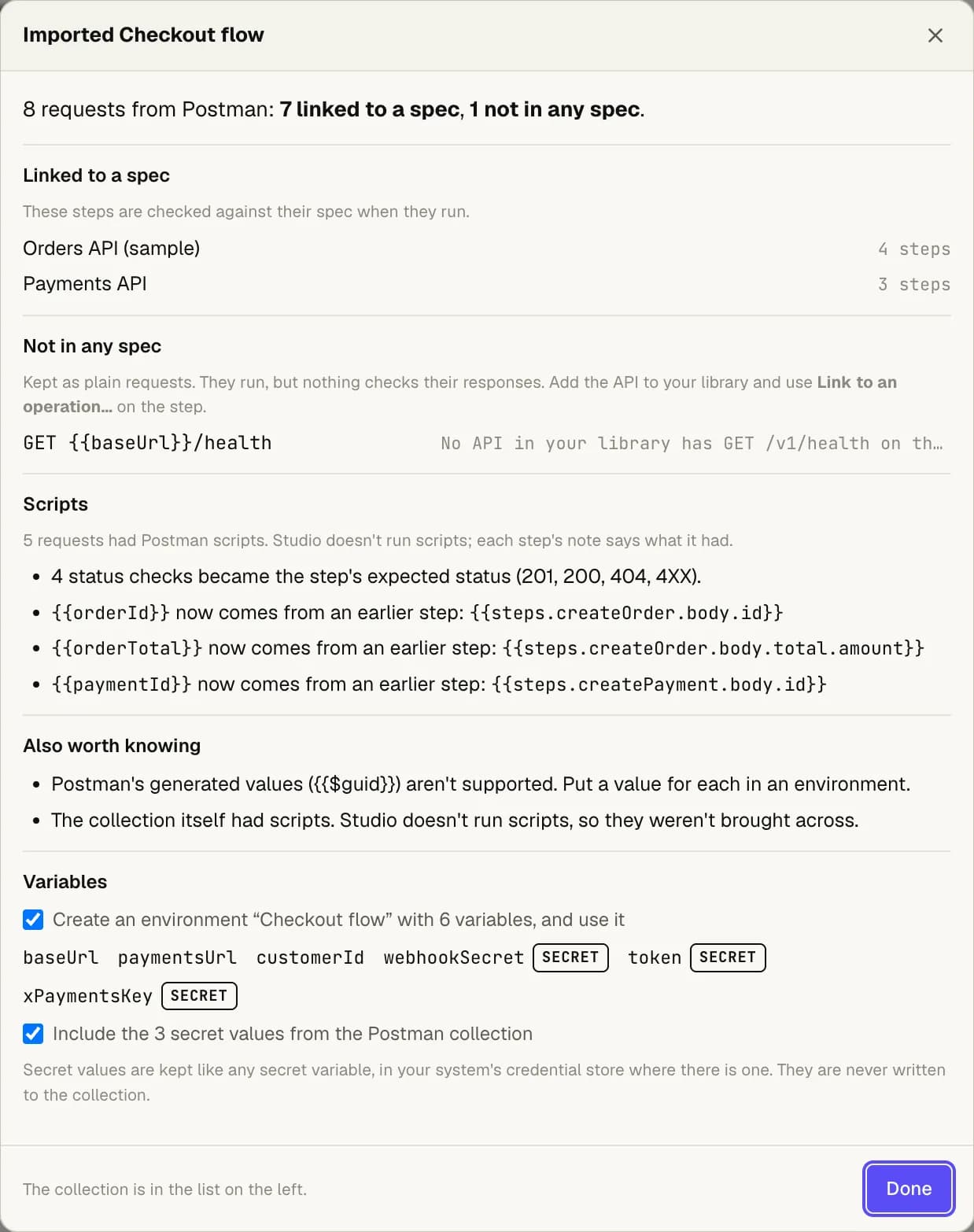
Each step also keeps a note of anything that needs your attention, shown above its request.
Good to know
- Scripts don't run. Only the two kinds above are converted. Pre-request scripts, and
collection and folder scripts, are listed in the summary but not converted. A value a script
works out (with
.length, arithmetic or string building) stays a{{variable}}. - Some auth isn't converted. OAuth 2, digest and other Postman auth types are noted on the step, not converted. Basic auth built from variables can't be encoded when the spec has no basic scheme; the step's note says so.
- Some bodies aren't converted. The body mode that sends a whole file isn't brought across. A multipart body on a step that isn't linked is kept, but only sent once the step is linked.
- Other formats. Insomnia and Bruno files, Postman v1 collections, and Postman environment files aren't supported yet. Studio recognises them and says so.